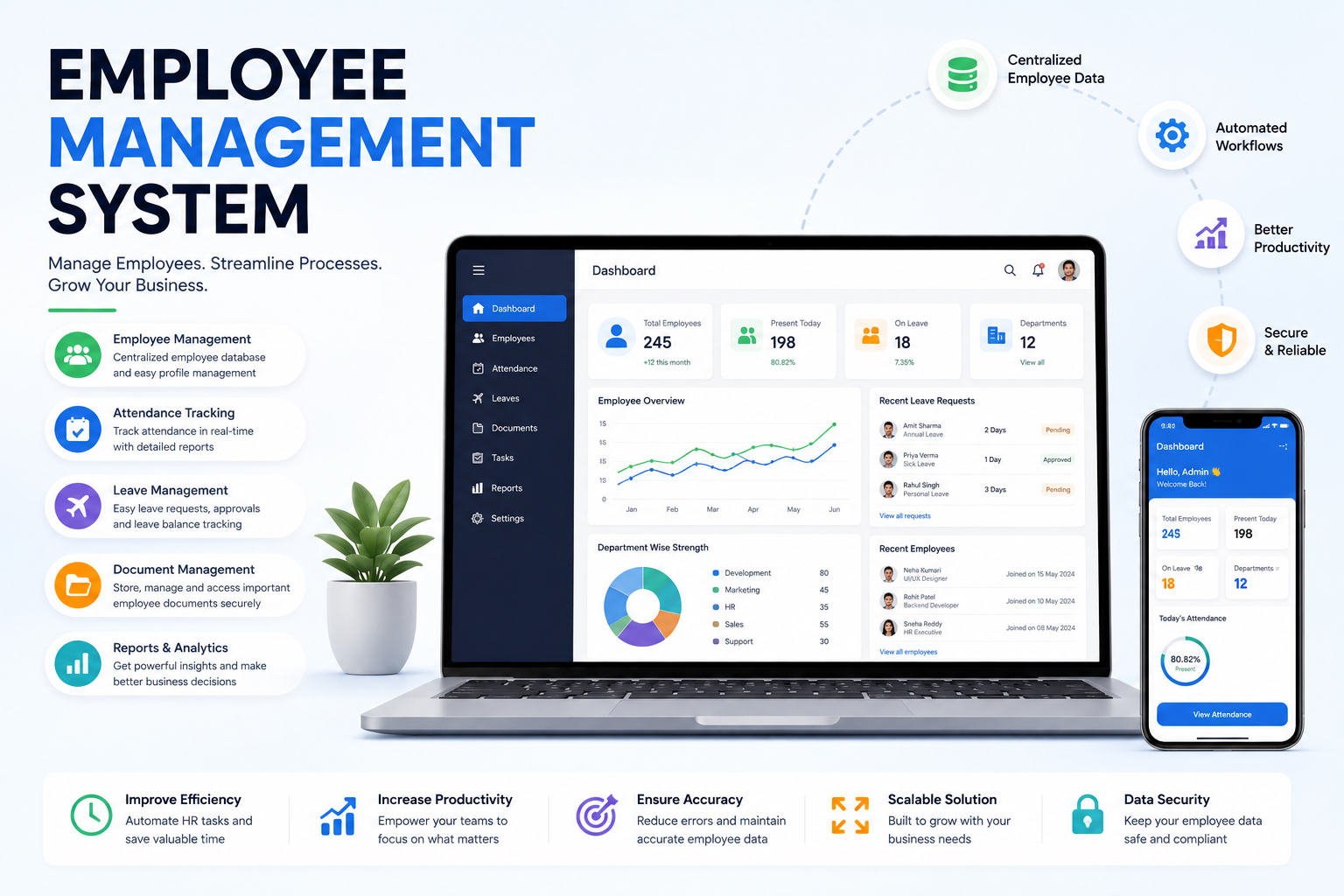
Managing employees becomes more challenging as a business grows. Employee records, attendance, leave requests, departments, documents, work schedules and reporting data can quickly become scattered across spreadsheets, emails and multiple tools.
An employee management system helps businesses organize these processes through a centralized digital platform. Instead of manually managing employee information, HR teams, managers and administrators can access relevant data, manage workflows and monitor workforce operations from one system.
A modern employee management software solution can be customized according to business requirements. A small company may need employee records, attendance and leave management, while a larger organization may require multiple branches, advanced permissions, reporting, workflow automation and integrations.
At WEPROZTECH, we develop custom business software based on specific organizational workflows. An employee management system can be designed for startups, SMEs, schools, healthcare organizations, service companies and growing enterprises.
What Is an Employee Management System?
An employee management system is software designed to organize, manage and maintain employee-related information and workforce processes.
The system can provide a centralized platform for managing:
- Employee profiles
- Employee records
- Departments and designations
- Attendance
- Leave requests
- Work schedules
- Employee documents
- Reporting structures
- Roles and permissions
- Notifications
- Reports and analytics
Depending on the organization's requirements, the platform can also connect with payroll software, biometric devices, accounting systems, mobile applications and other business tools.
A custom system allows businesses to create workflows based on their actual operations rather than adjusting every process to fit generic software.
How Does an Employee Management System Work?
An employee management system typically connects employees, managers, HR teams and administrators through different dashboards and permission levels.
Employee Information Management
The HR team or administrator creates and manages employee profiles.
Information may include:
- Employee name
- Employee ID
- Contact details
- Department
- Designation
- Joining date
- Reporting manager
- Employment status
- Work location
- Required documents
The information is stored in a centralized employee database.
Employee Dashboard
Employees can access features based on the permissions assigned to their account.
Depending on the system, employees may be able to:
- View and update approved profile information
- Check attendance
- Apply for leave
- View leave history
- Access documents
- Receive company notifications
- View assigned tasks
Manager Dashboard
Managers can receive access to information related to their teams.
A manager dashboard may include:
- Team attendance
- Leave approval requests
- Employee information
- Team reports
- Task assignments
- Workforce notifications
HR and Admin Dashboard
Administrators can manage the overall system, employee records, departments, permissions and organizational workflows.
Key Features of Employee Management Software
The features required in an employee management system software depend on the size and workflow of the organization.
Employee Database Management
A centralized employee database helps businesses organize workforce information in one place.
Each employee profile can contain personal, professional and employment-related details.
The database can be searched and filtered by:
- Department
- Designation
- Location
- Employment status
- Joining date
- Reporting manager
This can make employee information easier to access for authorized users.
Employee Profile Management
Each employee can have a dedicated digital profile.
The profile may include:
- Personal information
- Employment history
- Department details
- Job role
- Skills
- Certifications
- Documents
- Reporting structure
Custom fields can also be added based on business requirements.
Employee Attendance Management System
An employee attendance management system helps organizations digitally record and monitor attendance.
Attendance can be managed through:
- Manual check-in and check-out
- Employee web portal
- Mobile applications
- Biometric device integration
- QR-based systems
- Location-based attendance
Managers and administrators can access attendance information through centralized dashboards and reports.
Businesses looking to build a mobile workforce solution can also connect this functionality with a custom mobile application through internal services such as Mobile App Development.
Leave Management
A leave management module creates a structured process for submitting and approving employee leave requests.
Employees can:
- Apply for leave
- Select leave type
- Choose leave dates
- Add a reason
- Track request status
- View leave history
Managers or authorized users can review and approve requests through defined workflows.
Department and Designation Management
Organizations can structure employees according to departments, teams and job roles.
For example:
- Human Resources
- Sales
- Marketing
- Operations
- Finance
- Technology
- Customer Support
The system can also define reporting relationships between employees and managers.
Employee Document Management
An employee management system can help organize important employee-related documents.
Examples include:
- Offer letters
- Appointment letters
- Experience certificates
- Educational documents
- Training certificates
- Company policy documents
Access permissions should ensure that sensitive information is available only to authorized users.
Employee Self-Service Portal
An employee self-service portal allows employees to perform selected actions without depending on the HR team for every request.
Employees may be able to:
- Update profile information
- Apply for leave
- Check attendance
- Download available documents
- View announcements
- Submit requests
This can reduce repetitive administrative work.
Role-Based Access Control
Different users require different levels of access.
For example:
Employee: Access to personal information and assigned features.
Manager: Access to relevant team information and approvals.
HR: Access to employee records and HR workflows.
Administrator: Full or advanced system management access.
Role-based access is an important consideration when designing custom business software.
Benefits of an Employee Management System
A properly designed employee management system can improve how businesses organize workforce information and internal processes.
Centralized Employee Information
Instead of maintaining multiple spreadsheets and disconnected files, employee information can be organized within one platform.
Reduced Manual Work
Digital workflows can reduce repetitive administrative tasks related to:
- Employee record management
- Leave requests
- Attendance review
- Report preparation
- Internal notifications
Better Workforce Visibility
Managers can access relevant information about employees, departments and workforce activities through dashboards and reports.
Structured Leave and Approval Workflows
Requests can move through predefined approval processes instead of relying only on emails or messaging applications.
Improved Data Organization
A centralized system can make it easier to search, update and manage employee information.
Scalable Business Operations
Additional modules can be introduced as the company grows.
For example, a business may initially implement employee records and attendance, then later add reporting, automation, integrations and mobile access.
Employee Management System for Small Businesses
An employee management system for small business does not need to include every possible HR feature.
A focused system may begin with:
- Employee profiles
- Employee database
- Attendance management
- Leave management
- Departments
- Document storage
- Basic reporting
As the organization grows, additional functionality can be added.
This approach helps businesses build software around current requirements while keeping future expansion possible.
Custom software development can be especially useful when a business has specific workflows that are not supported by standard applications.
Employee Management System vs Manual Spreadsheets
Many businesses start by managing employees through spreadsheets. While spreadsheets can work for smaller teams, managing a growing workforce may become more complex.
| Feature | Manual Spreadsheets | Employee Management System |
|---|---|---|
| Employee records | Multiple files | Centralized database |
| Attendance | Manual updates | Digital management |
| Leave requests | Emails and messages | Structured workflow |
| Access control | Limited | Role-based permissions |
| Reports | Manual preparation | Dashboard and reporting |
| Employee profiles | Separate information | Centralized profiles |
| Scalability | Can become difficult | Expandable modules |
The appropriate solution depends on the organization's size and operational requirements.
Important Modules in an Employee Management System
A complete employee management software platform can include several connected modules.
Core Employee Management Module
This module manages:
- Employee records
- Departments
- Designations
- Reporting structures
- Employment information
Attendance Management Module
This can include:
- Daily attendance
- Check-in and check-out
- Shift records
- Attendance reports
Leave Management Module
The leave module can manage:
- Leave types
- Leave balances
- Leave requests
- Approval workflows
- Leave history
Document Management Module
Employee-related documents can be organized with access restrictions and permission controls.
Notification Module
Notifications can be used for:
- Leave approvals
- Important announcements
- Document requests
- Attendance updates
- Internal reminders
Reports and Analytics Module
Businesses can generate reports related to:
- Total employees
- Department-wise employee count
- Attendance
- Leave activity
- Employee status
- Workforce growth
HR Management System vs Employee Management System
An HR management system and an employee management system may share several features.
An employee management system generally focuses on managing employee information and workforce-related activities such as attendance and leave.
A broader HR management system may also include:
- Recruitment
- Candidate management
- Employee onboarding
- Performance management
- Training
- Employee lifecycle management
The required functionality should be determined based on the organization's actual processes.
Businesses do not always need to implement every module from the beginning.
Custom Employee Management Software
Ready-made software can be suitable for standard business requirements. However, many organizations operate with unique approval processes, reporting requirements and internal workflows.
A custom employee management software solution can be developed around those requirements.
Custom functionality may include:
- Custom employee fields
- Organization-specific workflows
- Multi-level approvals
- Custom dashboards
- Multi-branch management
- Advanced reporting
- API integrations
- Mobile applications
- Biometric device integration
- Internal software integration
Businesses that require a tailored platform can explore Custom Software Development Services from WEPROZTECH through an internal link to the relevant service page.
Employee Management System With Attendance and Leave Management
For many businesses, a practical starting point is a platform combining the most frequently used employee management features.
The core system can include:
- Employee records
- Attendance tracking
- Leave requests
- Leave approvals
- Departments
- Designations
- User roles
- Basic reporting
Additional modules can later be introduced based on changing business requirements.
This modular approach can help avoid unnecessary complexity during the initial implementation.
Employee Management System With Payroll Integration
An employee management platform may also integrate with payroll or accounting systems when the required technical interfaces are available.
Relevant information may include:
- Employee records
- Attendance data
- Leave information
- Work schedules
The exact integration depends on the organization's payroll process and the software being used.
For businesses requiring multiple connected systems, an internal link can also point to ERP and Business Software Solutions offered by WEPROZTECH.
Employee Management System for Multiple Locations
Businesses operating from multiple branches may require centralized employee management.
A multi-location system can support:
- Branch management
- Location-based employees
- Branch administrators
- Department structures
- Location-specific reports
- Role-based access
Head office administrators can access organization-wide information, while branch managers can be restricted to data relevant to their locations.
Employee Management System Security
Employee information can include sensitive personal and business data, so security should be considered during software planning and development.
Important considerations may include:
Secure Authentication
Users should access the platform through secure authentication processes.
Role-Based Permissions
Employees, managers, HR teams and administrators should only receive access relevant to their responsibilities.
Data Access Controls
Sensitive employee information should be restricted to authorized users.
Activity Logs
Depending on the requirements, important administrative actions can be recorded for monitoring and review.
Secure Software Development
Businesses can refer to security resources such as OWASP for general application security guidance and best practices.
How to Choose the Right Employee Management System
Before selecting or developing an employee management system, businesses should first identify the problems they need to solve.
Identify Your Current Challenges
Consider which processes are currently difficult to manage.
For example:
- Employee data is spread across multiple files.
- Attendance is managed manually.
- Leave requests are handled through WhatsApp or email.
- Reports require significant manual work.
- Multiple branches need separate access controls.
Define Required Features
Create a list of essential modules and optional future features.
Start with the functionality that provides immediate value.
Consider Existing Software
Check whether the employee management system needs to connect with:
- Payroll software
- Biometric devices
- Accounting software
- Mobile applications
- Internal databases
- Other business platforms
Plan for Future Growth
The software architecture should allow new features, users and integrations to be added when required.
Employee Management System Development Process
Custom employee management software development generally follows a structured process.
Requirement Analysis
The development team identifies:
- Required users
- User roles
- Required modules
- Current business workflows
- Integration requirements
- Reporting needs
System Architecture Planning
The application architecture can include:
- Database structure
- Backend APIs
- User authentication
- Permission systems
- Application modules
- Integration architecture
UI and Dashboard Design
Different interfaces can be designed for:
- Employees
- Managers
- HR teams
- Administrators
The goal is to ensure that users can access relevant features without unnecessary complexity.
Development
The frontend, backend, database and required integrations are developed according to the approved requirements.
For web-based platforms, businesses can also explore WEPROZTECH's internal Web Development Services page.
Testing
The application should be tested for:
- Feature functionality
- User permissions
- Data handling
- Workflow accuracy
- Error handling
- Performance
Deployment and Maintenance
After testing, the platform can be deployed to suitable infrastructure.
Future updates may include new features, integrations and workflow improvements.
Employee Management System for Different Industries
Different industries may require different employee management workflows.
Employee Management for Schools
Schools may require management of:
- Teachers
- Administrative staff
- Departments
- Attendance
- Leave
- Employee documents
This can also connect with a broader school management platform.
Employee Management for Healthcare Organizations
Healthcare organizations may need:
- Staff records
- Department assignments
- Shift schedules
- Role-based access
- Leave management
Employee Management for Retail Businesses
Retail businesses can manage:
- Store-wise employees
- Work shifts
- Attendance
- Manager approvals
Employee Management for Service Companies
Service-based businesses may require employee data alongside:
- Project assignments
- Team structures
- Task management
- Department-level access
Why Businesses Choose Custom Employee Management Software
Custom development can provide flexibility when standard software does not match a company's requirements.
A custom system can offer:
- Business-specific workflows
- Custom dashboards
- Flexible permissions
- Required integrations
- Multi-location support
- Custom reports
- Scalable architecture
Instead of forcing the organization to change every process, the software can be developed around the required workflow.
The suitability of custom development depends on the complexity, budget and long-term requirements of the business.
Employee Management System Cost
The cost of developing an employee management system depends on the project scope.
Important factors include:
- Number of modules
- Number of users
- User roles and permissions
- Attendance functionality
- Leave workflows
- Multi-branch requirements
- Mobile application requirements
- Third-party integrations
- Reporting requirements
- Hosting infrastructure
- Security requirements
A basic employee management platform will have different requirements from a large enterprise workforce management system.
The best approach is to first define the required modules and workflows before preparing a development scope.
Frequently Asked Questions About Employee Management Systems
What is an employee management system?
An employee management system is software used to organize and manage employee records, attendance, leave, departments, documents and other workforce-related processes.
What are the main features of employee management software?
Common features include employee profiles, employee databases, attendance management, leave management, departments, roles, permissions, document management and reporting.
Is an employee management system useful for small businesses?
Yes. Small businesses can use a focused employee management system to organize employee records, attendance and leave. Additional modules can be added as the organization grows.
Can an employee management system track attendance?
Yes. Depending on the software architecture, attendance can be recorded through manual check-in, web portals, mobile applications or supported third-party attendance systems.
Can employees apply for leave online?
Yes. An employee self-service portal can allow employees to submit leave requests, track approval status and review leave information.
Can employee management software support multiple branches?
Yes. A custom system can be designed for multiple locations with branch-level employees, permissions, administrators and reports.
Can an employee management system integrate with other software?
Yes. If the required APIs or technical interfaces are available, the platform can integrate with payroll software, biometric systems, mobile applications and other business tools.
Is custom employee management software better than ready-made software?
It depends on the requirements. Ready-made software may be suitable for standard workflows, while custom development can be useful for businesses with unique processes, integrations or functionality requirements.
How long does it take to develop an employee management system?
The timeline depends on the number of modules, integrations, user roles, workflows and overall complexity of the application.
How much does an employee management system cost?
The cost depends on the required features, integrations, user roles, infrastructure and customization involved in the project.
Build a Custom Employee Management System With WEPROZTECH
Managing employee information through multiple spreadsheets, emails and disconnected tools can become increasingly difficult as a business grows.
A centralized employee management system can help organize employee records, attendance, leave requests, approvals, documents and workforce workflows in one platform.
WEPROZTECH can help businesses plan and develop custom software based on their specific requirements.
Depending on your project, the solution can include:
- Employee management dashboard
- Employee profiles
- Employee database
- Attendance management
- Leave management
- Department management
- Role-based access
- Document management
- Reports and analytics
- Workflow automation
- API integrations
- Mobile application support
- Custom admin panels
You can internally link this section to relevant WEPROZTECH pages such as Custom Software Development, Web Development, Mobile App Development, and ERP & Business Solutions.
Final Thoughts
An employee management system can help businesses create a more organized approach to managing workforce information and internal processes.
The right system should be based on the actual requirements of the organization. A small business may only need employee records, attendance and leave management, while a larger organization may require advanced workflows, integrations, multi-location support and detailed reporting.
By selecting the right features and planning for future growth, businesses can build an employee management software solution that supports their workforce operations and evolves alongside the organization.