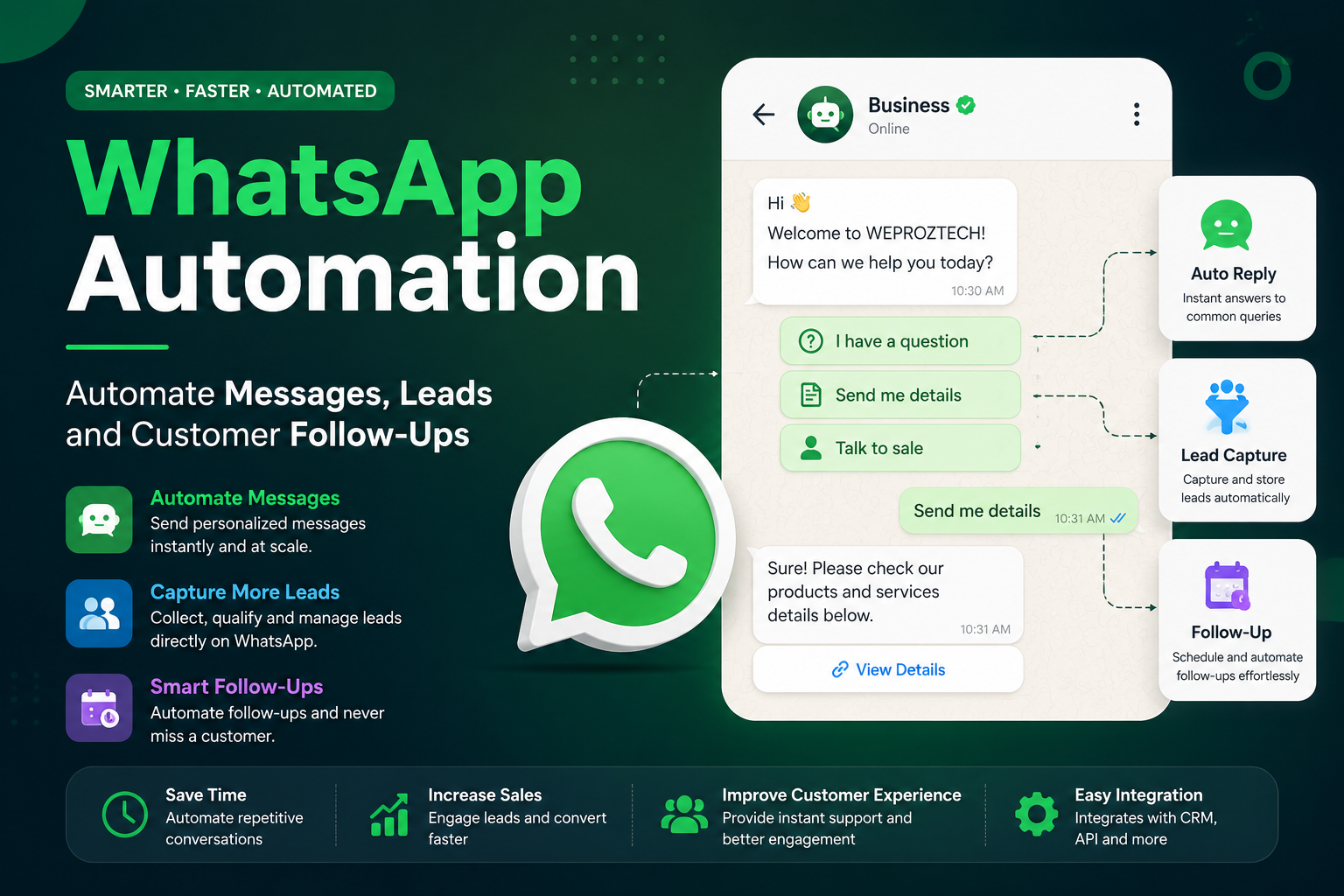
Build Smarter Customer Communication With WhatsApp Automation
WhatsApp has become an important communication channel for businesses. Customers use it to ask questions, enquire about products and services, request prices, book appointments, check order updates and follow up with sales teams.
Managing every conversation manually can become difficult as enquiry volume grows.
WhatsApp Automation helps businesses automate selected parts of customer communication, lead management and follow-up workflows. Depending on the business requirements and approved messaging setup, an automated system can respond to enquiries, collect information, qualify leads, update a CRM, notify team members and trigger follow-up workflows.
WEPROZTECH develops custom web, mobile, ERP and business automation solutions that can be designed around specific business workflows.
Whether you want to automate customer enquiries, create a WhatsApp chatbot, connect WhatsApp with your CRM or build a complete lead management workflow, the right architecture can turn everyday conversations into organized business processes.
Turn WhatsApp Conversations Into Automated Business Workflows
✓ Automated customer responses
✓ WhatsApp lead capture
✓ Lead qualification workflows
✓ CRM integration
✓ Automated follow-ups
✓ Team notifications
✓ Customer support automation
✓ Website-to-WhatsApp workflows
✓ AI chatbot integration
✓ Custom API and business software integration
Discuss Your WhatsApp Automation Project
What Is WhatsApp Automation?
WhatsApp Automation is the use of approved software, APIs and automated workflows to handle defined business communication processes on WhatsApp.
Instead of manually performing every repetitive action, a business can create workflows for tasks such as:
- Sending predefined responses where appropriate
- Routing enquiries to the correct team
- Collecting lead information
- Asking qualification questions
- Creating or updating CRM records
- Sending reminders
- Providing order or service updates
- Triggering internal notifications
- Handing complex conversations to human agents
For businesses using WhatsApp Business Platform capabilities, Meta provides official developer documentation for Cloud API integration and webhook-based communication.
The goal should not be to automate every conversation blindly. A good WhatsApp automation strategy identifies repetitive, structured tasks that can be automated while keeping human support available for complex or sensitive conversations.
How WhatsApp Automation Works
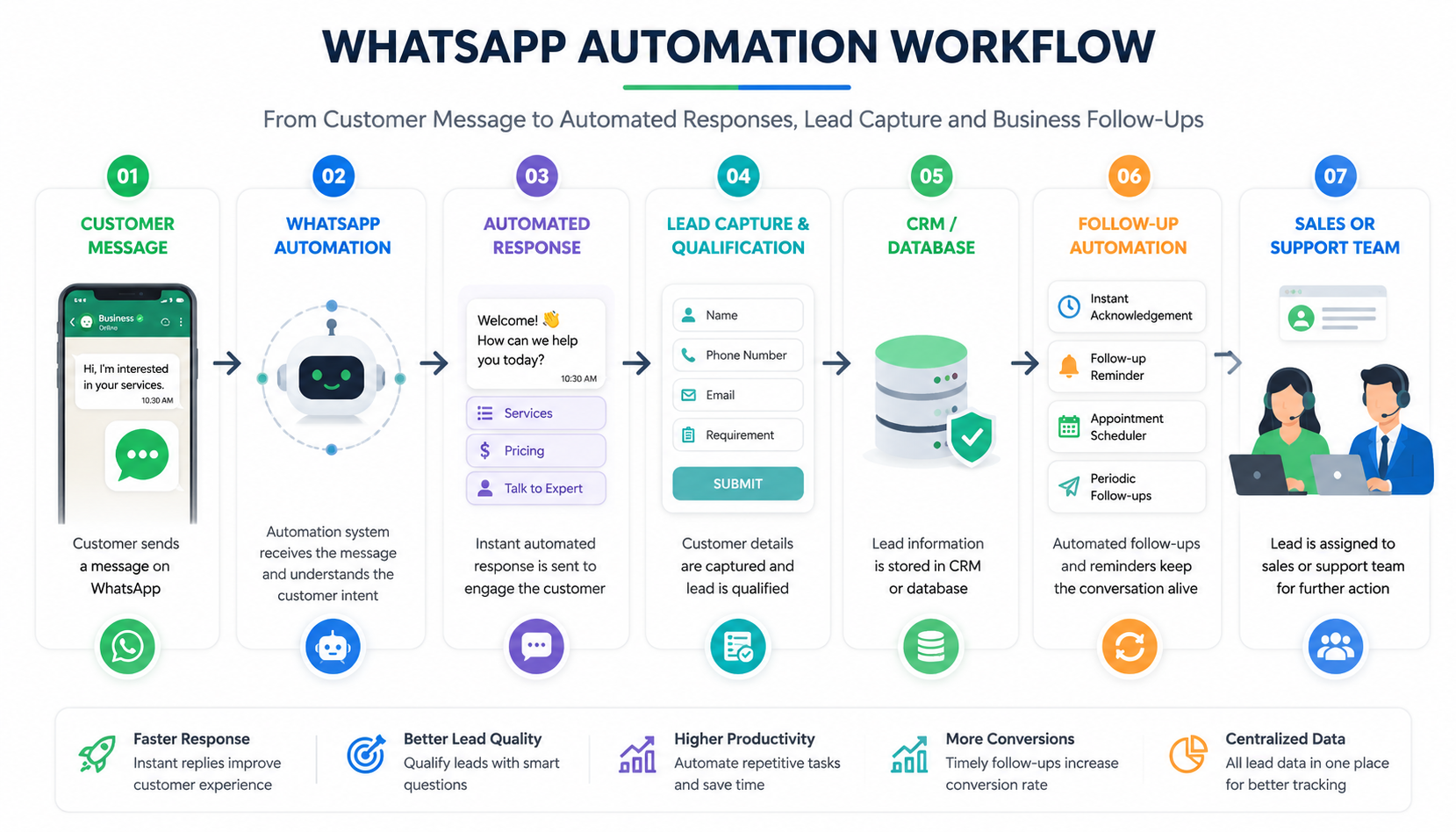
A typical WhatsApp business automation workflow can look like this:
Customer Message → WhatsApp Business Platform → Automation Logic → Response or AI Processing → Lead/CRM Update → Team Notification → Follow-Up
For example:
- A potential customer sends a WhatsApp message.
- The system identifies the type of enquiry.
- An automated workflow asks relevant questions.
- Customer details are collected.
- The lead is stored in a database or CRM.
- A sales representative is notified.
- The system can trigger the next approved follow-up action.
The exact implementation depends on the messaging setup, APIs, integrations and business rules.
 Why Businesses Are Using WhatsApp Automation
Customers often prefer fast, conversational communication instead of filling out long forms or waiting for an email response.
However, as message volume increases, teams can face problems such as:
- Slow response times
- Missed enquiries
- Forgotten follow-ups
- Unorganized customer conversations
- Duplicate lead information
- Difficulty assigning enquiries
- Repetitive customer questions
- Limited visibility into sales conversations
A properly designed automation system can help create a more structured process.
Key Benefits of WhatsApp Automation
- Faster initial responses
- More organized lead collection
- Reduced repetitive work
- Better follow-up consistency
- Centralized customer information
- Improved team coordination
- Integration with CRM and business software
- Support for scalable communication workflows
WhatsApp Automated Messages
One of the most common uses of WhatsApp automation is sending messages based on defined triggers and approved messaging rules.
Examples may include:
- Welcome messages
- Enquiry acknowledgements
- Appointment reminders
- Payment notifications
- Order updates
- Service reminders
- Follow-up messages
- Support updates
- Internal team notifications
For businesses building these workflows through the official platform, message delivery and messaging capabilities depend on the applicable WhatsApp Business Platform policies and technical setup.
Example Automated Message Workflow
New Website Enquiry
Website visitor submits enquiry
↓
Lead details are captured
↓
Lead enters CRM
↓
Automation triggers WhatsApp communication
↓
Sales team receives notification
↓
Follow-up activity is assigned
This can connect website lead generation with WhatsApp and internal sales operations.
For businesses that need custom websites connected with lead workflows, see WEPROZTECH's web and custom portal services.
WhatsApp Lead Automation
Generating leads is only the first step. A business also needs to organize, qualify and follow up with those leads.
A WhatsApp lead automation system can help guide customers through a structured conversation.
For example, the system can collect:
- Customer name
- Phone number
- Required product or service
- Business requirement
- Budget range
- Preferred location
- Project timeline
- Other qualification details
After collecting information, the workflow can send the lead to a CRM or custom database.
Example Lead Qualification Flow
Customer: I need a website for my business.
Automation:
- What type of business do you operate?
- What features do you require?
- Do you already have a domain?
- What is your expected project timeline?
- What is the best time for our team to contact you?
The collected information can help the sales team understand the requirement before contacting the customer.
For more advanced lead management architecture, WhatsApp conversations can be connected with custom ERP and CRM workflows. WEPROZTECH's ERP and CRM solutions include workflow automation and WhatsApp-related business integrations.
WhatsApp CRM Automation
A WhatsApp CRM connects customer communication with customer records, leads, sales activities and follow-up processes.
Instead of managing conversations separately from business data, a connected system can help create a centralized workflow.
A WhatsApp CRM may include:
- Customer profiles
- Lead records
- Conversation history
- Sales pipeline stages
- Lead assignment
- Follow-up reminders
- Team access
- Notes and activity history
- Automated workflow triggers
- Reporting dashboards
Example WhatsApp CRM Workflow
WhatsApp Message
↓
Lead Identified
↓
CRM Record Created or Updated
↓
Lead Assigned to Sales Team
↓
Follow-Up Scheduled
↓
Sales Status Updated
This is particularly useful for businesses receiving enquiries from multiple channels.
You can internally link this section to your existing WhatsApp CRM article using anchor text such as:
WhatsApp CRM: Manage Leads, Customers and Sales Conversations in One Place
WhatsApp Follow-Up Automation
Many potential customers do not make a purchase or booking during their first conversation.
A follow-up process is often required.
Without an organized system, teams may forget:
- Which customer needs a response
- When to follow up
- What information was previously shared
- Who is responsible for the lead
WhatsApp follow-up automation can help structure these processes.
Example Follow-Up Sequence
Day 0: Customer submits an enquiry.
Immediate Action: Enquiry acknowledgement and lead creation.
Day 1: Follow-up task is created for the sales team.
After Defined Conditions: Additional approved communication or reminder workflow may be triggered.
Sales Update: Lead status is updated based on the customer's response.
Automation should support the sales process rather than sending unnecessary or unwanted messages.
WhatsApp Customer Support Automation
Customer support teams often receive the same questions repeatedly.
Examples include:
- What are your prices?
- What are your business hours?
- How can I book a service?
- Where is my order?
- How do I contact support?
- What documents are required?
A WhatsApp automation workflow can help provide approved answers to common questions.
WhatsApp Support Automation Can Help With
- Frequently asked questions
- Basic product information
- Service information
- Order updates
- Booking-related queries
- Support routing
- Knowledge base access
- Human agent escalation
For complex situations, the system can be designed to transfer the conversation to an appropriate human team member.
AI-Powered WhatsApp Automation
Traditional automation follows predefined rules and workflows.
AI-powered automation can add additional capabilities such as understanding natural-language questions, retrieving information from approved knowledge sources and identifying the likely intent of a customer message.
For example, a customer might ask:
“I run a coaching institute and need an app where students can see attendance and fees.”
An AI-assisted workflow could potentially identify the relevant requirement, retrieve approved service information and ask follow-up questions before routing the enquiry to the appropriate team.
The exact capabilities depend on the AI model, data, permissions and workflow architecture.
For a related internal link, connect this section to your AI Chatbot Development Company page using the anchor text:
Custom AI Chatbot Development for Businesses
WEPROZTECH also discusses AI agents and WhatsApp-related automation workflows in its recent guide on AI agents for small businesses.
WhatsApp Automation for Different Businesses
WhatsApp Automation for Service Businesses
Service businesses can automate:
- New customer enquiries
- Service information
- Price-related initial questions
- Project requirement collection
- Appointment requests
- Sales team notifications
- Follow-up reminders
WhatsApp Automation for E-Commerce
An e-commerce workflow may support:
- Product enquiries
- Order-related information
- Delivery updates
- Customer support routing
- Product recommendations
- Abandoned enquiry follow-ups where applicable
WhatsApp Automation for Healthcare Platforms
Automation can assist with non-emergency administrative workflows such as:
- Appointment-related communication
- General service information
- Reminder workflows
- Support routing
Sensitive information should be handled according to applicable privacy, security and regulatory requirements.
WEPROZTECH's healthcare CRM architecture includes appointment scheduling and automated communication workflows as part of broader hospital operations.
WhatsApp Automation for Education
Educational organizations can automate:
- Course enquiries
- Admission information
- Fee-related notifications
- Student support routing
- Parent communication workflows
- Reminder messages
WEPROZTECH's education-focused ERP ecosystem includes digital workflows such as fee-related communication and attendance systems.
WhatsApp Automation for Real Estate
Real estate businesses can use automation for:
- Property enquiries
- Buyer qualification
- Budget collection
- Location preferences
- Site visit requests
- Sales team assignment
- Follow-up workflows
WhatsApp Automation With Website Integration
Your website and WhatsApp workflow can work together.
For example:
Website Visitor → WhatsApp Conversation → Lead Qualification → CRM → Sales Team
A visitor may click a WhatsApp button instead of filling out a traditional contact form.
The conversation can then be connected with a structured lead workflow.
A custom implementation may include:
- Click-to-chat entry points
- Website lead forms
- CRM integration
- Lead source tracking
- Automated notifications
- Sales team assignment
- Follow-up management
WEPROZTECH offers web and mobile development alongside ERP and business systems, making it possible to plan connected workflows rather than treating the website and backend as separate systems.
WhatsApp API Automation and Custom Integration
For advanced workflows, WhatsApp communication can be connected with APIs and business systems.
Possible integrations include:
- CRM software
- Custom CRM systems
- ERP software
- Customer databases
- Lead management systems
- E-commerce platforms
- Booking systems
- Support platforms
- Internal dashboards
- Mobile applications
- Web applications
Meta's official WhatsApp developer resources document API-based business messaging and webhook integration capabilities for developers.
Example Custom Integration Architecture
Customer
↓
WhatsApp Business Platform
↓
Webhook / Backend API
↓
Automation Engine
↓
CRM / Database
↓
Sales or Support Team
A custom architecture can be useful when ready-made software does not match the business workflow.
For mobile-based business systems, link internally to WEPROZTECH's mobile application development services.
Direct WhatsApp API vs Third-Party Platform
Businesses can choose different implementation approaches depending on their technical requirements.
One approach may involve building directly around Meta's official platform capabilities. Another approach may use a third-party software provider or business solution platform.
The right choice can depend on:
- Required features
- Development resources
- User interface requirements
- Existing integrations
- Workflow complexity
- Ongoing operational requirements
- Pricing model
- Level of customization
Before choosing an architecture, review the applicable official documentation and platform requirements.
When Custom Development May Make Sense
Custom WhatsApp automation can be useful when a business needs:
- A dedicated CRM
- Specific lead workflows
- Custom dashboards
- Proprietary business logic
- Integration with internal software
- Multiple connected databases
- AI-powered workflows
- Specialized reporting
- Role-based team access
WhatsApp Automation Services We Can Build
Depending on project requirements, a custom WhatsApp automation solution may include:
Automated Message Workflows
Trigger communications based on defined events and approved messaging workflows.
WhatsApp Chatbot
Create structured conversations for FAQs, lead collection and customer guidance.
AI WhatsApp Assistant
Connect an AI system with approved business information and defined workflows.
Lead Capture Automation
Collect customer information and automatically create structured lead records.
CRM Integration
Connect WhatsApp conversations with customer and sales data.
Sales Automation
Route leads, assign team members and organize follow-up activities.
Customer Support Automation
Automate selected repetitive support processes and route complex requests.
Custom Dashboard
Create a dedicated dashboard for managing leads, conversations and business workflows.
API Integration
Connect WhatsApp workflows with existing business applications and services.
How WEPROZTECH Builds WhatsApp Automation Solutions
WEPROZTECH's broader service portfolio covers custom web portals, mobile applications, ERP/CRM systems and AI-related development, which can support projects requiring connected automation architecture.
1. Business Workflow Analysis
First, identify:
- Where customer enquiries originate
- What information needs to be collected
- Which tasks are repetitive
- Who handles each type of enquiry
- What systems need integration
- What should remain under human control
2. Automation Strategy
Next, define:
- Conversation entry points
- Automation triggers
- Qualification questions
- CRM fields
- Team assignment rules
- Escalation workflows
- Follow-up processes
3. Architecture and Integration Planning
The technical architecture may include:
- WhatsApp platform integration
- Backend APIs
- Webhooks
- Database architecture
- CRM integration
- Authentication
- User roles
- Admin dashboards
4. Development
The development process can include:
- Backend development
- API integration
- Automation logic
- Database development
- Dashboard development
- AI integration where required
5. Testing
Before launch, test:
- Message workflows
- Webhook events
- API integration
- Lead creation
- CRM synchronization
- Error handling
- Human handover
- User permissions
6. Deployment and Improvement
After deployment, workflows can be monitored and improved based on actual business usage.
WhatsApp Automation Strategy: 7 Practical Ideas
1. Automate First Responses
Ensure new enquiries receive an appropriate initial response based on the defined workflow.
2. Qualify Leads Before Manual Follow-Up
Ask relevant questions before assigning every enquiry to a sales representative.
3. Connect Conversations With a CRM
Avoid keeping important customer information only inside individual chat histories.
4. Create Follow-Up Workflows
Use reminders, tasks and approved communication workflows to reduce missed opportunities.
5. Automate Repetitive FAQs
Allow automation to handle common questions while complex issues are routed to humans.
6. Connect Website and WhatsApp
Create a connected customer journey between your website, enquiry system and WhatsApp communication.
7. Add AI Where It Provides Real Value
AI can help understand flexible customer questions, but simple rule-based workflows may be more suitable for predictable processes.
WhatsApp Automation vs WhatsApp Marketing
These terms are related but not identical.
WhatsApp Automation
Focuses on automating defined communication and business processes.
Examples:
- Lead capture
- Follow-ups
- Customer support workflows
- CRM updates
- Notifications
- Team routing
WhatsApp Marketing
Focuses more on promotional communication and marketing campaigns.
Examples:
- Campaign messaging
- Product promotions
- Customer engagement campaigns
- Marketing workflows
A business may use both, but the system architecture and objectives should be clearly defined.
WhatsApp Automation and Customer Data
Customer communication workflows can involve personal or business information.
Therefore, a system should consider:
- Access control
- Data security
- User permissions
- Secure API connections
- Database security
- Consent and applicable messaging rules
- Data retention requirements
For larger custom systems, role-based access and secure database architecture can be important parts of the overall design. WEPROZTECH describes role-based access controls and encrypted cloud architecture within its ERP services.
For projects requiring dedicated backend infrastructure, WEPROZTECH also provides cloud and VPS hosting options suitable for custom APIs and business applications.
Benefits of Custom WhatsApp Automation Software
Ready-made tools can be useful for standard requirements. However, businesses sometimes need workflows that match their own processes.
A custom system can provide greater control over:
Business Logic
Build workflows around your actual sales or support process.
Data Ownership and Architecture
Design the database structure around the information your business needs.
Integrations
Connect with existing software, APIs and internal systems where technically supported.
Custom Dashboard
Create screens for leads, conversations, reports and team workflows.
Scalability
Plan the system architecture for future features and additional integrations.
AI Integration
Add AI capabilities when natural-language understanding or knowledge retrieval is useful.
WhatsApp Automation Use Cases
Here are practical examples of where automation can be applied:
| Business Requirement | Possible WhatsApp Automation |
|---|---|
| New enquiry | Automated acknowledgement and lead capture |
| Website lead | WhatsApp communication and CRM entry |
| Sales enquiry | Qualification questions and team assignment |
| Missed follow-up | Reminder or workflow trigger |
| Common customer question | Automated approved response |
| Appointment request | Booking workflow and team notification |
| Existing customer | Record lookup and support routing |
| Order-related query | Integration with relevant business system |
| Internal process | Team notifications and task triggers |
The best workflow depends on the specific business process.
WhatsApp Automation Cost
The cost of building a WhatsApp automation system depends on the project scope.
Factors may include:
- Number of workflows
- API integration requirements
- CRM development
- AI capabilities
- Database architecture
- Admin dashboard
- Number of users
- Third-party integrations
- Hosting infrastructure
- Security requirements
- Ongoing maintenance
A simple automated lead workflow and a complete multi-user WhatsApp CRM with AI, dashboards and multiple integrations will have very different development requirements.
For an estimate, the first step should be to define what you want to automate.
Frequently Asked Questions About WhatsApp Automation
What is WhatsApp Automation?
WhatsApp Automation uses approved business messaging capabilities, software and workflows to automate selected customer communication and business processes.
Can WhatsApp Automation capture leads?
Yes. A workflow can ask qualifying questions, collect relevant information and send that data to a CRM or database.
Can WhatsApp be connected with a CRM?
Yes. Depending on the available APIs and system architecture, WhatsApp communication can be connected with CRM and backend systems. Meta provides official developer resources for business messaging APIs and webhooks.
Can WhatsApp Automation send follow-up messages?
Automation can support defined follow-up workflows, subject to the applicable messaging setup, customer permissions and platform rules.
Can multiple employees use a WhatsApp automation system?
A custom system can be designed with multiple users, role-based access, lead assignment and centralized workflow management.
Can I connect my website with WhatsApp Automation?
Yes. Website forms, chat entry points and enquiry workflows can be connected with WhatsApp, CRM systems and custom backend applications.
Can AI be added to WhatsApp Automation?
Yes. Depending on the use case, AI can help understand natural-language queries, retrieve approved information and support structured workflows.
What is the difference between WhatsApp Automation and WhatsApp CRM?
WhatsApp Automation focuses on automating communication and workflows, while a WhatsApp CRM focuses on organizing customer data, leads, sales activities and relationship management. Both can be connected within the same system.
How much does WhatsApp Automation cost?
The cost depends on the required features, integrations, AI capabilities, user accounts, infrastructure and overall workflow complexity.
Is custom WhatsApp Automation better than ready-made software?
It depends on the business. Ready-made software may be suitable for standard requirements, while custom development can be useful when a business requires specific workflows, integrations and proprietary functionality.
Start Your WhatsApp Automation Project
Ready to Automate Your WhatsApp Business Communication?
Your team should not have to manually repeat every response, search through hundreds of chats for leads or remember every follow-up.
A well-designed WhatsApp Automation system can help organize conversations, capture leads, support customers and connect communication with your wider business workflow.
Tell us what you want to automate.
Whether you need a WhatsApp chatbot, automated lead capture, CRM integration, follow-up workflow, AI assistant or complete custom business automation system, WEPROZTECH can help plan and develop the right architecture.
WEPROZTECH's official services cover custom web systems, mobile applications, ERP/CRM solutions and AI-related development.
Get a Free Consultation
Discuss Your Project
Request a Custom Quote
For direct project enquiries, use the WEPROZTECH contact page