Introduction
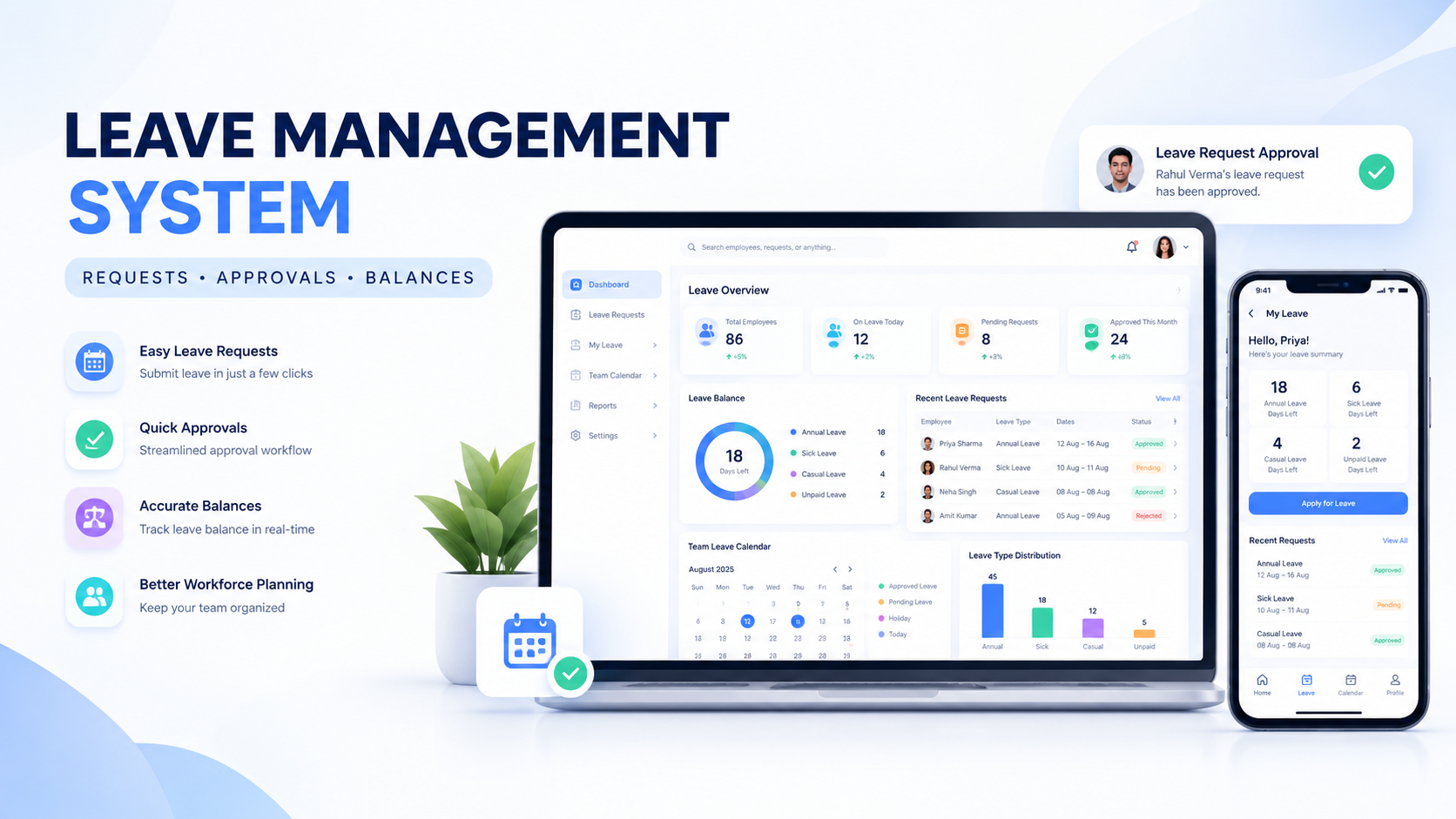
Managing employee leave manually can become difficult as a business grows. Leave requests may come through WhatsApp, emails, phone calls or paper forms, making it challenging for HR teams and managers to track requests, approvals, leave balances and employee availability.
A leave management system helps businesses organize the entire employee leave process in one centralized platform.
Employees can submit leave requests online, managers can review and approve requests, and HR teams can maintain accurate records of leave balances and history. Depending on the requirements, a modern leave management software solution can also connect with attendance, payroll, employee management and other business systems.
For growing organizations, an employee leave management system can reduce manual work, improve visibility and create a more structured approval process.
WEPROZTECH develops custom business software solutions that can be designed around an organization's specific workflow, employee policies and operational requirements.
What Is a Leave Management System?
A leave management system is software used to manage employee leave requests, approvals, leave balances, leave policies and leave records.
Instead of tracking employee leave through spreadsheets or multiple communication channels, businesses can manage the complete process through one system.
A typical leave management software platform can include:
- Employee leave requests
- Leave types
- Leave balances
- Leave approval workflows
- Manager approvals
- Leave history
- Holiday calendars
- Employee availability
- Notifications and reminders
- Attendance integration
- Reports and analytics
The exact functionality depends on the organization's requirements.
A small business may only require basic leave requests and approvals, while a larger organization may need multi-level approvals, multiple branches, department-level access and integration with an Employee Management System.
Suggested Internal Link:
Link the phrase Employee Management System to your existing Employee Management System blog.
How Does a Leave Management System Work?
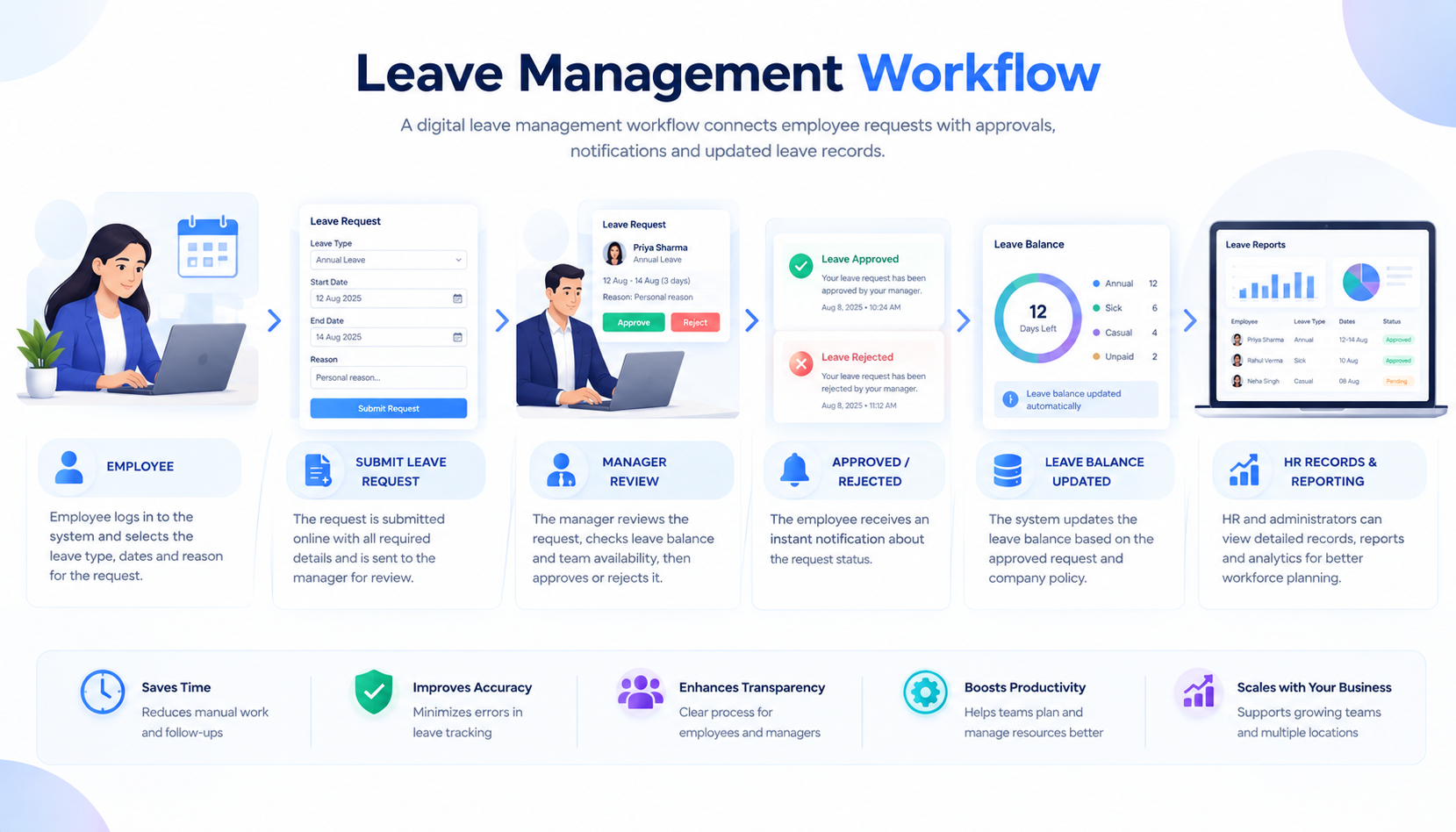
An online leave management system creates a structured workflow between employees, managers and HR teams.
Employee Submits a Leave Request
The employee logs into the system and submits a leave request.
The request may include:
- Leave type
- Start date
- End date
- Number of leave days
- Reason for leave
- Supporting documents, if required
The system records the request and sends it to the appropriate manager or approver.
Manager Reviews the Request
The manager can review relevant information before making a decision.
Depending on the system configuration, the manager may see:
- Employee leave balance
- Previous leave history
- Team availability
- Existing approved leaves
- Requested dates
The manager can then approve, reject or return the request for additional information.
Leave Balance Is Updated
Once the request is approved, the system can update the employee's leave information according to the configured leave policy.
Employee Receives a Notification
The employee can receive a notification about the request status.
Notifications may be delivered through:
- Web dashboard
- Mobile application
- Internal notification system
- Connected messaging workflows
HR and Management Can Access Reports
Authorized users can review leave data across employees, teams or departments.
This creates a more organized alternative to manually maintaining leave records.
 Key Features of a Leave Management System
The features of an employee leave management software solution can vary depending on business requirements.
Online Leave Requests
Employees can submit leave requests through a web or mobile interface.
This can reduce the need for manual forms and unstructured communication.
Employees may be able to:
- Select leave type
- Choose leave dates
- Add a reason
- Upload supporting documents
- Check request status
- View leave history
Leave Approval Workflow
A structured approval workflow ensures that requests are sent to the correct person.
The workflow can be customized based on the organization.
For example:
Employee → Reporting Manager → HR
More complex organizations may require:
Employee → Team Manager → Department Head → HR
Custom approval workflows can be configured based on company policies.
Leave Balance Management
A leave tracking system can help maintain records of available and used leave.
The system may track:
- Total allocated leave
- Used leave
- Remaining leave
- Pending leave requests
- Carry-forward leave
The calculation rules should be configured according to the organization's leave policy.
Multiple Leave Types
Businesses may create different leave categories.
Examples can include:
- Casual leave
- Sick leave
- Annual leave
- Earned leave
- Maternity leave
- Paternity leave
- Unpaid leave
- Work from home requests
A custom system can allow organizations to create leave types based on their internal policies.
Leave Calendar
A centralized leave calendar can help managers understand employee availability.
The calendar may display:
- Approved leave
- Pending requests
- Company holidays
- Department availability
This can be useful when planning projects, shifts and team workloads.
Employee Leave History
Employees and authorized administrators can access historical leave information.
This may include:
- Previous requests
- Approved leave
- Rejected requests
- Pending requests
- Leave balances
Notifications and Reminders
Notifications can inform employees and managers about important actions.
For example:
- New leave request
- Pending approval
- Leave approval
- Leave rejection
- Leave balance updates
Automation can reduce the need for manual follow-ups.
Role-Based Access
Different users should have access to different parts of the system.
For example:
Employees can manage their own leave requests.
Managers can review relevant team requests.
HR teams can manage employee leave records and policies.
Administrators can manage the overall system configuration.
Benefits of Using Leave Management Software
A well-designed leave management system can help organizations improve how they manage employee leave processes.
Reduces Manual Work
Instead of managing leave through paper forms, emails and spreadsheets, requests can follow a structured digital workflow.
Improves Leave Tracking
HR teams and managers can access relevant leave information from one centralized platform.
Creates a Clear Approval Process
Employees know where to submit requests, while managers have a defined process for reviewing them.
Provides Better Employee Visibility
Managers can understand when team members are available or on approved leave.
Helps Maintain Leave Records
A centralized employee leave tracker can maintain historical leave information for authorized users.
Reduces Communication Gaps
Automated notifications can inform relevant users about request updates.
Supports Business Growth
As the number of employees increases, businesses can add departments, managers, branches and additional workflows.
Leave Management System vs Manual Leave Tracking
Many small businesses initially track employee leave manually.
While this may work for a small team, it can become difficult as the organization grows.
| Feature | Manual Leave Tracking | Leave Management System |
|---|---|---|
| Leave requests | WhatsApp, email or paper | Centralized digital requests |
| Approval process | Manual communication | Defined workflow |
| Leave balance | Spreadsheet calculation | System-based tracking |
| Leave history | Multiple records | Centralized history |
| Notifications | Manual follow-up | Automated notifications |
| Reports | Manual preparation | Digital reporting |
| Scalability | Difficult with growth | Expandable |
An automated leave management system can help create a more consistent process, particularly for organizations with multiple employees and managers.
Employee Leave Management System for Small Businesses
Small businesses do not always require a complex HR platform.
A focused leave management system for small business can begin with essential features.
Essential Features for Small Businesses
A basic system may include:
- Employee profiles
- Leave types
- Online leave requests
- Manager approvals
- Leave balances
- Leave history
- Basic reports
As the company grows, additional modules can be added.
These may include:
- Attendance management
- Payroll integration
- Employee documents
- Performance management
- Multi-branch access
- Mobile applications
This modular approach allows businesses to start with their immediate requirements.
Leave Management System With Attendance Management
Leave and attendance are often closely connected.
When an employee's leave is approved, the information may need to be reflected in the organization's attendance workflow.
A connected system can help manage:
- Present employees
- Employees on approved leave
- Holidays
- Absent employees
- Work schedules
Businesses building a complete workforce solution can connect leave workflows with an Attendance Management System.
Leave Management System With Employee Management Software
A leave module can also be part of a broader employee management software platform.
The connected system may include:
- Employee profiles
- Departments
- Designations
- Reporting managers
- Attendance
- Leave management
- Documents
- Employee self-service
- Reports
Instead of maintaining separate employee information in different applications, businesses can manage related workflows from a centralized platform.
Automated Leave Management System
An automated leave management system can reduce repetitive administrative work.
Automation may be used for:
- Routing leave requests
- Sending approval notifications
- Reminding managers about pending requests
- Updating leave records
- Generating reports
- Sending employee notifications
The level of automation should depend on the company's workflow and policies.
For example, a request can automatically move to the employee's reporting manager, while another organization may require approval from multiple users.
Businesses interested in broader automation can also connect their leave management workflows with custom automation systems.
AI Automation or Business Automation
Leave Request Management Workflow
A structured leave request management system can follow several stages.
Step 1: Employee Creates Request
The employee selects:
- Leave type
- Start date
- End date
- Reason
Step 2: System Validates the Request
Depending on the configured rules, the system may check relevant information such as leave balance or request requirements.
Step 3: Request Is Sent for Approval
The request moves to the assigned manager or approval authority.
Step 4: Manager Takes Action
The manager may:
- Approve
- Reject
- Request additional information
Step 5: Employee Is Notified
The employee receives the updated status.
Step 6: Records Are Updated
The leave record can be reflected in relevant dashboards and connected workflows.
Types of Leave That Can Be Managed
A custom HR leave management software solution can support different leave categories based on organizational policies.
Casual Leave
Short-duration leave that may be used for personal requirements.
Sick Leave
Leave related to illness or medical reasons, depending on the organization's policy.
Annual or Earned Leave
Leave accumulated or allocated according to employment rules and company policies.
Unpaid Leave
Leave that may not be included in paid leave allowances.
Maternity and Paternity Leave
Special leave categories based on applicable laws and organizational policies.
Custom Leave Types
Organizations can create custom leave categories based on their internal requirements.
The system should be configured according to the applicable employment rules and the organization's approved policies.
Multi-Level Leave Approval System
Some organizations require more than one person to approve a leave request.
A multi-level workflow may look like:
Employee → Reporting Manager → Department Head → HR
Different departments can also have different approval structures.
A custom leave management system can support organization-specific workflows where technically required.
Leave Management System for Multiple Branches
Companies operating from multiple locations may require centralized leave management.
A multi-branch system can support:
- Branch-specific employees
- Location-specific managers
- Department structures
- Branch-level holidays
- Centralized administration
- Branch-wise reports
Head office administrators can access broader data, while branch managers may receive limited access to their relevant teams.
Mobile Leave Management System
Employees increasingly access business applications through smartphones.
A mobile leave management system can allow employees to submit and track leave requests without requiring access to a desktop computer.
A mobile application may provide:
- Leave application
- Request status
- Leave history
- Notifications
- Leave balance
- Team calendar
Businesses can develop a dedicated employee mobile application as part of a broader Mobile App Development project.
Custom Leave Management Software
Ready-made software may be suitable for standard workflows.
However, some organizations require functionality that does not fit into generic HR software.
A custom leave management software solution can be developed according to specific requirements.
Custom features may include:
- Custom leave policies
- Multiple approval levels
- Department-specific workflows
- Custom leave categories
- Branch management
- Custom reports
- API integrations
- Mobile application
- Attendance integration
- Payroll integration
- Employee self-service portal
Custom development can be useful when the business has unique operational requirements.
Leave Management System Security
Employee data should be protected through appropriate security and access controls.
Secure User Authentication
The application should use appropriate authentication methods for employees and administrators.
Role-Based Permissions
Users should only access the information required for their responsibilities.
Data Access Controls
Sensitive employee information should be restricted to authorized users.
Activity Logs
Depending on business requirements, administrative actions can be logged for review and monitoring.
For general web application security guidance, developers and businesses can refer to OWASP and its security resources.
Organizations handling employee data should also consider applicable privacy, employment and data protection requirements relevant to their location.
How to Choose the Right Leave Management System
Before selecting or developing software, businesses should evaluate their actual requirements.
Number of Employees
A company with 20 employees may require a simpler workflow than an organization with thousands of employees.
Existing Leave Process
Identify how leave is currently managed.
For example:
- WhatsApp messages
- Emails
- Paper forms
- Excel spreadsheets
- Existing HR software
Required Approval Workflow
Determine whether the business requires:
- Single-level approval
- Manager and HR approval
- Multiple management levels
Integration Requirements
The system may need to connect with:
- Attendance software
- Payroll systems
- Biometric systems
- Employee management platforms
- Mobile applications
Future Growth
The platform should be able to support additional employees, departments, branches and features.
Leave Management System Development Process
Custom software development generally begins with understanding the business workflow.
Requirement Analysis
The development team identifies:
- Number of employees
- User roles
- Leave types
- Approval workflows
- Existing business processes
- Integration requirements
- Reporting requirements
System Planning
The application architecture can be planned around:
- Database structure
- User roles
- Leave rules
- Approval workflows
- Notifications
- API integrations
UI and Dashboard Design
Different interfaces may be designed for:
- Employees
- Managers
- HR teams
- Administrators
Software Development
The required frontend, backend, database and integrations are developed.
Businesses requiring a custom web platform can explore WEPROZTECH's Web Development Services.
Suggested Internal Link:
Link Web Development Services to your WEPROZTECH service page.
Testing
The system should be tested for:
- Leave request workflows
- Approval permissions
- User access
- Notifications
- Data accuracy
- Error handling
Deployment
After testing, the application can be deployed to appropriate infrastructure.
Leave Management System for Different Industries
Different industries may require different employee leave workflows.
Leave Management for Schools
Schools may need to manage leave for:
- Teachers
- Administrative staff
- Support staff
The leave module can also connect with a broader school or staff management platform.
Leave Management for Healthcare Organizations
Healthcare organizations may require leave information alongside staff schedules and department requirements.
Leave Management for Retail Businesses
Retail businesses can manage employee leave alongside:
- Store locations
- Shift schedules
- Team availability
Leave Management for Service Companies
Service businesses may require leave information alongside project assignments and workforce planning.
Leave Management System Cost
The cost of developing a leave management system depends on the required features and complexity.
Factors may include:
- Number of users
- Employee roles
- Approval workflows
- Multi-branch functionality
- Attendance integration
- Payroll integration
- Mobile application
- Custom reports
- API integrations
- Hosting infrastructure
- Security requirements
A simple leave management application will have different requirements from a complete enterprise workforce management platform.
The most effective approach is to first define the required modules and workflows.
Frequently Asked Questions About Leave Management Systems
What is a leave management system?
A leave management system is software used to manage employee leave requests, approvals, leave balances, leave history and related workflows.
What are the main features of leave management software?
Common features include online leave requests, leave types, approval workflows, leave balances, employee leave history, notifications and reporting.
Can employees apply for leave online?
Yes. An online leave management system can allow employees to submit leave requests through a web or mobile application.
Can managers approve or reject leave requests?
Yes. Managers or other authorized users can review requests and approve, reject or manage them according to the configured workflow.
Can a leave management system track leave balances?
Yes. Depending on the configured leave policy, the system can maintain information about allocated, used and remaining leave.
Can leave management software integrate with attendance?
Yes. A custom solution can integrate leave workflows with attendance systems where the required technical interfaces are available.
Is leave management software useful for small businesses?
Yes. Small businesses can use a focused leave management system to organize employee leave requests, approvals and records.
Can multiple managers approve a leave request?
Yes. A custom system can be designed with multi-level approval workflows.
Can a leave management system support multiple branches?
Yes. Multi-location organizations can manage employees, branches, managers and location-specific workflows through a centralized platform.
How much does a leave management system cost?
The cost depends on the required features, number of users, integrations, approval workflows and customization requirements.
Build a Custom Leave Management System With WEPROZTECH
Managing employee leave through multiple WhatsApp messages, emails and spreadsheets can become increasingly difficult as an organization grows.
A centralized leave management system can help businesses manage:
- Employee leave requests
- Leave approvals
- Leave balances
- Leave history
- Employee availability
- Notifications
- Reports
- Attendance integration
- Custom workflows
WEPROZTECH can help businesses plan and develop custom leave management software based on their specific requirements.
The solution can also be connected with:
- Employee Management System
- Attendance Management System
- HR workflows
- Payroll systems
- Mobile applications
- ERP and business software
Suggested Internal Links for this section:
- Custom Software Development
- Employee Management System
- Attendance Management System
- Web Development Services
- Mobile App Development
- ERP & Business Solutions